
Download Tokonda – Web Messenger, Desktop App, Web Tools
Overview
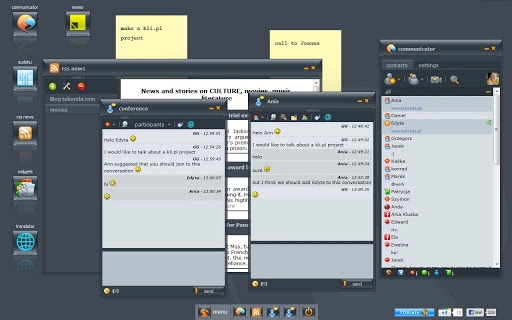
Tokonda is a web-based multi-messenger and personal virtual desktop designed to consolidate communication and productivity tools within a single browser interface. Built as a desktop application accessible via web browser, it enables users to manage multiple messaging platforms without installing separate software. The application supports a range of protocols including Jabber, Gtalk, MSN, Facebook, Gadu-Gadu, Tlen, and others expected to be added in the future. Its core purpose is to streamline digital interaction by offering instant messaging, video and voice conferencing, chat history, and a suite of utility tools—all from one unified environment.
Target users include remote workers, digital nomads, and individuals seeking a lightweight, cross-platform communication hub. The platform is particularly useful for those who prefer browser-based access over traditional desktop clients. Real-world use cases include team collaboration, personal messaging across multiple networks, and embedding interactive communication tools into websites via the TOK2me widget. The developer, Tokonda, positions the software as a modern alternative to fragmented messaging ecosystems.
Key Features & Capabilities
- Multi-Protocol Messaging – Connects to multiple messaging services like Jabber, Gtalk, MSN, Facebook, Gadu-Gadu, and Tlen through a single interface, reducing the need to switch between apps.
- Web-Based Access – Runs directly in modern browsers without installation, allowing instant access from any device with internet connectivity.
- Video and Voice Conferences – Supports real-time audio and video calls, enabling remote meetings and virtual gatherings.
- LiveAvatars – Offers dynamic avatars that reflect user activity, enhancing visual communication in chat sessions.
- Chat History Storage – Preserves conversation records across sessions, ensuring continuity and easy reference.
- TOK2me Widget – Allows website owners to embed a live chat tool on their pages, enabling direct communication with visitors.
- Tokonda Status Widget – Displays real-time presence status in the system taskbar for quick visibility.
- TOKinfo Notifier – Provides desktop notifications for messages and updates, minimizing missed communications.
- Desktop Utility Applications – Includes lightweight tools such as Sudoku, Snake, RSS Reader, Memo, Yellow Pages, and customizable Tokonda Widgets.
These features collectively support seamless communication and light productivity tasks, making Tokonda suitable for both personal and professional use. The integration of web tools into a messaging environment reduces desktop clutter and enhances workflow efficiency.
User Interface, Workflow & Performance
The user interface of Tokonda is designed around a browser-based desktop metaphor, offering a clean and intuitive layout. Navigation is structured through a sidebar menu that provides access to messaging contacts, chat history, utility apps, and configuration settings. The layout adapts to different screen sizes, supporting both desktop and mobile views via the m.tokonda.com domain.
Workflow efficiency is enhanced by the unified interface, which allows users to manage multiple accounts and applications without context switching. The use of widgets and embedded tools enables quick access to frequently used functions. However, performance details such as CPU and RAM usage were not specified by the developer.
Since Tokonda operates as a web application, its performance depends on the user’s internet connection and browser capabilities. General software behavior patterns suggest stable operation under typical conditions, but exact stability metrics were not provided. The developer did not specify resource usage details, so users should monitor performance based on their system configuration.
Compatibility & System Requirements
Tokonda is compatible with Windows, Mac, and Linux operating systems, ensuring broad accessibility across major desktop platforms. The software is delivered as a web application, meaning it does not require traditional installation and runs directly in supported browsers.
The installation size is listed at 1.5 MB, indicating a lightweight footprint. This suggests minimal storage impact and fast load times. However, exact system requirements such as minimum RAM, processor speed, or browser version were not listed. Compatibility information was partially provided, with no mention of specific browser support or hardware prerequisites.
Users should ensure their system meets standard web browsing requirements to run Tokonda effectively. The developer did not specify resource usage details, so performance may vary depending on device capabilities and network conditions.
Pros and Cons
Pros
- Runs in any modern web browser without installation
- Supports multiple messaging protocols in one interface
- Lightweight at just 1.5 MB
- Includes built-in utilities like Sudoku, Snake, RSS Reader, and Memo
- Offers web embedding tools like TOK2me and status widgets
- Accessible from any device with internet access
Cons
- No official information on supported browsers or minimum system specs
- Performance and resource usage details were not provided
- Mobile version is in beta, may have limited functionality
- Relies entirely on internet connectivity for full operation
- Advanced features like video conferencing may require stable bandwidth
FAQ Section
Is Tokonda compatible with all major browsers?
The developer did not specify which browsers are supported. Users should test compatibility with their preferred browser.
Can I use Tokonda offline?
Tokonda is a web-based application and requires an active internet connection for full functionality. Offline capabilities were not mentioned.
Is Tokonda safe to use?
Tokonda operates through standard web protocols. The developer did not provide specific security details or encryption standards.
How often are updates released?
Update frequency was not specified. Users should check the official website for the latest version.
What kind of license does Tokonda use?
Tokonda is available for free, but the specific license type was not disclosed by the developer.
Final Thoughts + CTA
Tokonda presents a compelling solution for users seeking a lightweight, browser-based communication and productivity platform. By combining instant messaging, conferencing, and utility tools into a single interface, it offers a streamlined alternative to managing multiple desktop applications. Its cross-platform compatibility and low footprint make it ideal for users who value accessibility and simplicity.
While some technical details remain unspecified, the core functionality is well-structured and practical for everyday use. The inclusion of web embedding tools like TOK2me expands its utility beyond personal messaging into web-based customer engagement.
For professionals and individuals looking for a modern, unified desktop experience without heavy software, Tokonda delivers strong value. Download Tokonda now.







